
If you already connected Search Console to Claude the way my guide does, GA4 is one API to switch on and one property ID to paste, and every answer on this page came through that route. Starting from zero, Google's official Google Analytics MCP server is free and read only, but it runs on your own computer and needs Python, pipx and the gcloud command line tool first. Paid connectors skip the setup and hold your Google permission on their servers instead.
What the Google Analytics MCP actually is
MCP is the standard Claude, Gemini and most AI tools use to plug into outside data. A GA4 MCP server sits between your Analytics property and the AI, so you can ask a question in plain words and get the answer from your own numbers instead of a guess.
Google's own server is open source on GitHub, under the Apache 2.0 licence, and labelled experimental. Google's documentation is direct about the limit: "The MCP server is available for read requests only. It can't edit your Google Analytics configuration or settings."
It runs locally. Claude starts it as a small program on your machine when it needs it. Google does not offer a hosted link you paste in, which is the most common complaint about it. If you want a hosted link, that is what the paid connectors sell.
The seven tools, and what each one answers
| Tool | What it does | A question that uses it |
|---|---|---|
| get_account_summaries | Lists the accounts and properties your Google login can see | Which GA4 properties do I have access to? |
| get_property_details | Returns one property's settings | What time zone and currency is this property set to? |
| list_google_ads_links | Lists the Google Ads accounts linked to a property | Is this property linked to our Ads account? |
| run_report | Runs a standard GA4 report, any dimensions and metrics | Which landing pages got organic sessions last month? |
| run_funnel_report | Runs a funnel report across steps | How many people went from the pricing page to signup? |
| get_custom_dimensions_and_metrics | Lists the custom dimensions and metrics you set up | What custom events can I report on? |
| run_realtime_report | Reports on activity happening now | How many people are on the site right now, and on which pages? |
Most of what you will ask runs through run_report. The others mostly help the AI find the right property and the right field names.
Three ways to connect GA4 to Claude, and which to pick
| The route I use | Google's official server | A paid hosted connector | |
|---|---|---|---|
| What it is | The free claude-seo plugin from my Search Console guide | googleanalytics/google-analytics-mcp | Pipedream, Composio, Zapier, Windsor.ai, Supermetrics, Coupler.io |
| What you install | Nothing new, if you did the Search Console guide | Python 3.10 or later, pipx, the gcloud CLI | Nothing. You sign in on their site |
| Who holds your Google permission | Your computer | Your computer | The vendor's servers |
| Search Console too | Yes, same sign in | No, Analytics only | Some do, as a separate connection |
| Cost | Free | Free | Usually a subscription |
| Best for | Anyone who already connected Search Console | Starting from zero, or using Gemini | Teams who will not touch a terminal |
All three are read only for GA4. The row that matters is who holds your permission. With the first two, your numbers go from Google to your computer to the AI you are using. With a hosted connector, a third company holds a standing key to your Analytics account. That can be fine. Make it a decision rather than a default.
Route one: the route I use, if you already connected Search Console
The permission I granted when I connected Search Console to Claude already includes read access to Analytics. So GA4 was one API and one line in a file. This assumes you finished the Search Console guide: a Google Cloud project, the app published, the sign in from step seven done. Starting from zero instead? Skip to route two.
Step one, on Google's side: switch on the Analytics Data API
Google Cloud Console, same project as before. Menu, APIs and Services, Library. Search for analytics, open Google Analytics Data API, click Enable. If you switched it on during the Search Console setup, as I did, it will say Manage instead. Skip ahead.
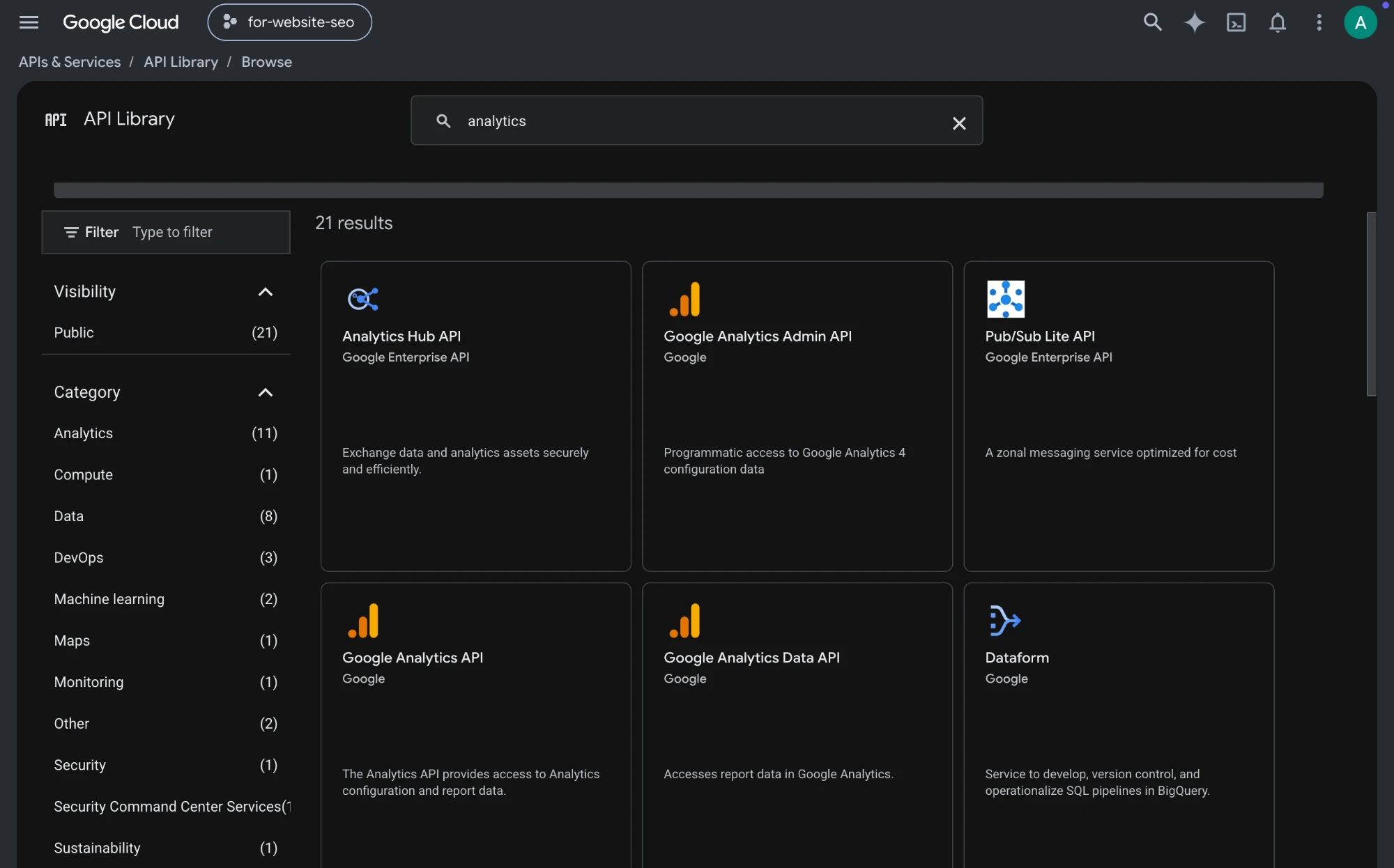
There are two Analytics APIs in that library that matter. The Data API reads your reports. The Admin API manages accounts and properties. For this route you only need the Data API.
One check. If you switched the Data API on after you did the Search Console sign in, your saved permission will not include Analytics yet. Run the sign in from step seven of that guide once more and click Allow. That is the only case where you need to.
Step two, on your computer: tell it which property
Find your GA4 property ID. In Google Analytics, open Admin, then Property details. The ID is the nine digit number at the top right.
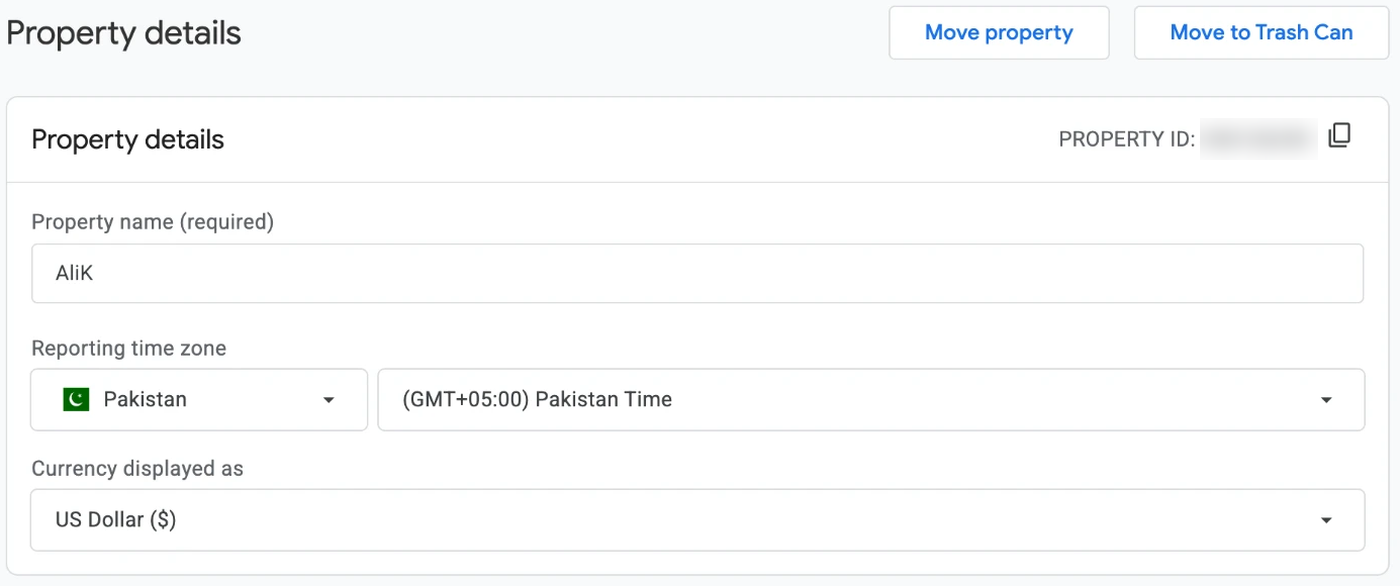
Open the same file from the Search Console guide, ~/.config/claude-seo/google-api.json, and add one line under the property you already have:
{
  "default_property": "sc-domain:yourdomain.com",
  "ga4_property_id": "properties/123456789"
}
Keep the word properties and the slash in front of the number. Without them the call fails, and the error does not tell you why.
Step three: prove it
Ask for the last 28 days of organic traffic:
claude-seo run ga4_report.py --days 28You should get a sessions total and a row per day. Mine came back with 36 organic sessions and 22 users for 11 September to 8 October. Small site, honest numbers.
If you get zero sessions on a site you know has traffic, it is one of two things: the property ID is wrong, or the Data API is not switched on. Check them in that order.
Route two: Google's official server, if you are starting from zero
These are the steps from Google's README on GitHub, checked on 18 October 2026. I did not use this route myself, because route one was already set up on my machine. If a step has changed, the README wins.
1. Install pipx
On a Mac with Homebrew, run brew install pipx, then pipx ensurepath, and restart the terminal.
2. Switch on two APIs
In Google Cloud Console, in the project you want to use: APIs and Services, Library. Enable the Google Analytics Admin API and the Google Analytics Data API. The official server needs both. The Admin API is how it lists your properties.
3. Sign in with gcloud
Install the gcloud CLI, then run Google's command:
gcloud auth application-default login \
  --scopes https://www.googleapis.com/auth/analytics.readonly,https://www.googleapis.com/auth/cloud-platform \
  --client-id-file=YOUR_CLIENT_JSON_FILE
YOUR_CLIENT_JSON_FILE is an OAuth client you download from Google Cloud. If you followed my Search Console guide, you already made one. The command prints where it saved your credentials. Copy that path.
4. Add it to Claude Code
claude mcp add analytics-mcp \
  --scope user \
  -e "GOOGLE_APPLICATION_CREDENTIALS=PATH_TO_CREDENTIALS_JSON" \
  -e "GOOGLE_PROJECT_ID=YOUR_PROJECT_ID" \
  -- pipx run analytics-mcp
Using Claude Desktop instead? The same server goes in its config file, under Settings, Developer, Edit Config, as an entry in mcpServers: command pipx, args run and analytics-mcp, and the same two environment values. Restart Claude Desktop after saving.
5. Prove it
Ask Claude: "Which GA4 properties can you see?" That calls get_account_summaries. If your property comes back, everything else will work.
What you can ask once it works
These are real questions I asked, with the real answers from my own property. Any of the three routes can answer the GA4 ones. The last one needs Search Console on the same connection.
"How many organic sessions did the site get each week this month?" 3, 16, 10, 2 and 5, across five weeks, the first and last of them partial. A dashboard gives you the chart. This gives you the number, and then you can ask why the week of 14 September was the best one.
"Which landing pages got organic sessions?" The homepage, by a distance: 18 of 36. Then the blog index, About, my schema post and the guides index, two each.
"Which AI tools sent people to the site, and where did they land?" From 1 August to 17 October, ChatGPT sent 8 sessions from 6 people. That is more than Bing, at 4. Perplexity, Claude, Gemini and Copilot sent none that GA4 could see. The ChatGPT visits landed on my homepage, About, my post on measuring AI referral traffic and my audit checklist, plus two where GA4 recorded no landing page. Small numbers, and the most useful question on this list for a B2B site, because it tells you which pages AI answers already send people to. How to set the tracking up properly is in my post on measuring AI referral traffic in GA4 and Search Console.
The same report showed a trap. search.google.com sent 47 sessions from 2 people. That is me, clicking through to my own pages from inside Search Console. If you check your site that way too, filter that source out before you read anything into your referral numbers.
"Which pages are showing up in Google but getting no visits?" This is the one that only works because Search Console and GA4 sit on the same permission. My Search Console guide had 82 impressions and not one session. Its average position was about 50, page five, where nobody clicks. My crawler user agents page had 20 impressions at position 11 and no visits either. That is the list I would actually act on: pages Google is already testing, sitting just below where people look.
A dashboard shows you one report at a time. This lets you ask the follow up, across both sources, in one sentence.
What it cannot do
- Change anything. Every route here is read only. It cannot create events, edit conversions or touch settings.
- Read Universal Analytics. GA4 only. Google has shut the old properties down.
- Show individual people. You get the same aggregated totals as the GA4 interface, including any rows GA4 withholds for privacy on small numbers.
- Show today in full. Standard reports fill in over the day. For what is happening right now, ask for a realtime report.
- Read Search Console, on the official server. It is Analytics only. Questions that need both, like the last one above, need a route with both on one sign in.
What Google charges
Nothing I have paid. Google publishes quotas for the Data API, not a price. For a standard property:
| Quota | Limit |
|---|---|
| Tokens per property per day | 200,000 |
| Tokens per property per hour | 40,000 |
| Requests at once | 10 |
A single small report uses a handful of tokens. One person asking questions about one site is not going to come close.
If it stops working
- Zero rows on a site you know has traffic. The property ID is wrong, or the Data API is not switched on. Check in that order.
- A permission error. The Google account you signed in with needs at least Viewer access on that GA4 property, in Analytics Admin. Owning the Cloud project is not enough.
- An "API has not been used in project" error. The API is off in the project your credentials belong to. Switch it on there, not in a different project.
- It worked last week and stopped for everything at once. The app on Google's side was left in Testing, where the saved permission expires every seven days. Publish the app and that stops.
- GA4 fails while Search Console still works, on route one. Check the property ID line first. Keep the word properties and the slash.
Is there an official Google Analytics MCP server?
Is there a hosted or remote Google Analytics MCP?
Does the Google Analytics MCP work with ChatGPT?
Is it safe to connect GA4 to Claude?
Do I need to sign in to Google again?
Does it work with Universal Analytics?
Can Claude see individual visitors?
Is it free?
Primary sources: Google Analytics MCP server (developers.google.com/analytics/devguides/MCP) · googleanalytics/google-analytics-mcp on GitHub · Google Analytics Data API quotas (developers.google.com/analytics/devguides/reporting/data/v1/quotas) · googleanalytics/google-analytics-mcp README and tool list, checked 18 October 2026 · My own GA4 property, 11 September to 8 October and 1 August to 17 October 2026. All accessed October 2026.